Agentic Engineering in mid-2026: Advice on scaling across your business
Practical guidance for scaling an agentic software development lifecycle in 2026, from reusable primitives and context strategy to governance and enterprise distribution.
Recently one of the most common workshop requests I receive is from teams working towards an Agentic Software Development Lifecycle (SDLC). They’ve successfully built their first few SDLC agents and now looking for advice in scaling them. This year most businesses have been moving through these 4 stages:
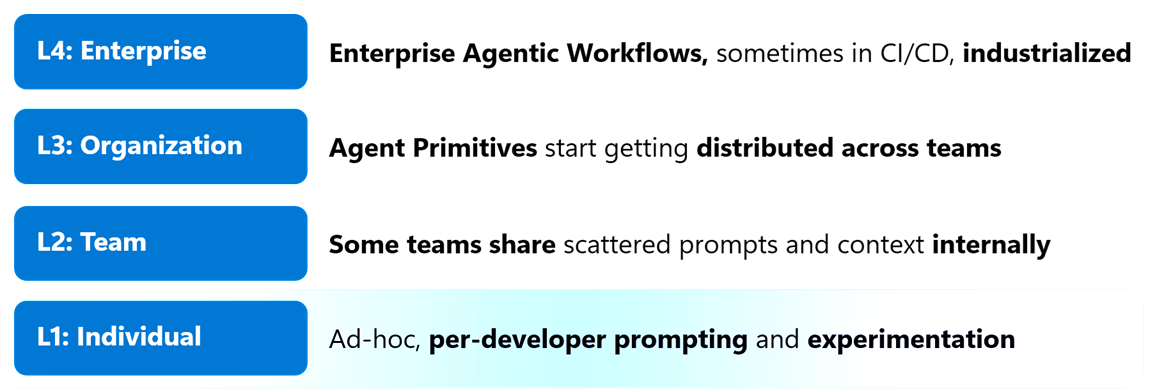
Agentic Engineering Stages
Below are some of my current thoughts and recommendations on doing this effectively. These are not ‘getting started tips’ for using or customizing agents, so if you need to catch up quickly on key concepts see past articles such as: Skills, Tools, Plugins, oh my! and Six Agentic Development fundamentals you should learn.
Part 1 - Invest In Agent Primitives
Tip #1 - Focus on learning and using agent primitives before anything else (a general term describing custom instructions, prompt files, agent files, tools, skills or hooks). They’re your team’s best investment right now and are mostly portable between platforms and tools. You avoid vendor lock-in, and maximize your impact across diverse groups (developers, product owners, architects, etc). Start with a resource like Customize AI in Visual Studio Code to understand how to apply them in a Copilot context.
There’s a lot of ‘engineering craft’ in creating good primitives today, but teams who excel in agentic engineering often have dev leads or senior engineers who invest time in configuring them, allowing all team members to realize benefits. As business productivity tools like Copilot Cowork roll out Skills and MCP support, there’s even more ROI potential for well-crafted primitives.
Tip #2 - Use a skills marketplace to learn and adopt new primitives for your agents. There are lots of published skills and primitives online, so start with a curated collection like Awesome GitHub Copilot to find new ideas that suit your workflow. Don’t go overboard installing skills you don’t need but whenever working in new areas remember to check what is available.
Part 2 - Feed Agents The Right Context
Agents love relevant context when they work, and it can be one of the biggest differences between getting the ‘right’ outcome from prompts or an unexpected one.
Tip #3 - Map out where your organizational knowledge lives, and how agents will access it. Knowledge sources like coding or architecture standards, process documentation or playbooks are often important but overlooked context for agents. Review where you maintain them today and how to provide agent access. This is usually via one of three methods:
- File based export, preferably into Markdown format. Great for content that isn’t often updated and isn’t high volume (100s or 1000s of pages).
- Dynamic retrieval, through MCP or API calls. Suits regularly updated content that is owned outside your team, but comes with a performance penalty. Using query-based tools like WorkIQ or FoundryIQ can help optimize this and lets agents ‘self-serve’ for info.
- Hybrid approach, where agents use dynamic retrieval periodically and sync content into files in a specific or common repo. GitHub’s Cloud Automations or Agentic Workflows are an easy way to implement this.
Tip #4 - Review what context you are giving agents periodically to see if you are overloading it with unnecessary information. Excessive custom instructions, and irrelevant MCP tools or skills enabled can all lead to poor cost or performance outcomes. Is your agent is tasked with performing a web accessibility review on your app? It probably doesn’t need access to your database or info on DB schemas right now.
Part 3 - Getting More From Every Agent Run
Tip #5 - Always use a plan-then-implement cycle for any non-trivial work by agents. Most Copilot UIs now have a dedicated Plan mode that can be toggled on, forcing your agent to do research and discuss questions with you before starting to implement any work. This is not only good for increasing chances of success first-time, but also for improving the cost per feature as agents won’t waste time on unnecessary tasks or guessing. For even more thorough planning, use the new Rubber Duck feature to have multiple models critique a single plan to minimize gaps.
Tip #6 - Invest in automated (deterministic) quality gates that validate outcomes from your agents without relying on LLMs or manual human review. These can be anything from unit or functional tests, to code quality scans or linters, build or deployment pipelines, or even stress/performance checks. The goal here is that as your volume of code produced scales up, you avoid moving your SDLC bottleneck immediately to another lifecycle phase. Agents love running these gated checks, but if they don’t exist they’ll usually not create them unless asked to.
Tip #7 - Turn regularly used agents or prompts into agentic workflows as they prove their value. There are now multiple ways to implement natural language workflows, including Automations in the new GitHub Copilot App (available as both local and cloud hosted), and GitHub Actions’ own Agentic Workflows, which suits team or enterprise-wide workflows as they scale.
Part 4 - Choose A Distribution Approach
Most agent customizations start life on someone’s PC, where they’re refined and tested on specific code. As they start proving value, it’s natural to share them across your wider team. Today any primitives you want to access locally must live in one of two places:
- Within the code repository you’re working on (which means any users of that repo will have access)
- Within your user profile folder (which means those primitives are usable only by you, but across all repos you work on)
But what if you want to share primitives across other teams?
Tip #8 - Set an enterprise direction for distributing primitives between teams. This is an evolving area still, but agent plugins are emerging as an open standard for distributing sets of primitives amongst teams. Consider an internal Plugin Marketplace for your business, and if possible use GitHub Cloud’s Enterprise Managed Plugins to set default plugin marketplaces or default-installed plugins, rather than relying on user’s pulling plugins manually.
Tip #9 - Offer a range of UIs on top of the same agent primitive layer to support different roles/personas. Not everyone will want to use the same UI for agents, but ideally the same agent primitives are accessible wherever they work. Many organizations now use a combination of traditional Developer IDEs (VS Code, JetBrains, etc), Terminal / CLI, Agentic productivity apps like Copilot Cowork or GitHub Copilot App, and even SDKs to power custom UIs. Make sure you distribute your primitives in a way that everyone can benefit from them.
Part 5 - Govern & Continuously Improve
Consider how you’re governing your agents, and what configurations you want to leave in each user’s hands vs enforcing via enterprise policies. GitHub Cloud allows you to centralize this governance layer - see GitHub Well Architected - Governing Agents for an in-depth look.
Tip #10 - Consider an internal MCP Registry and allowlist for your business. Some businesses continue to let developers configure MCP tools from any source, but moving to an internal registry provides tighter control so that each server is vetted by your administrators before being used.
Tip #11 - Consider scanning repositories for hidden vulnerabilities or malware in your primitive files themselves. A good SAST scanner like GitHub Code Security will protect against code-based vulnerabilities, but there are newer open-source libraries like those built into microsoft/apm: Agent Package Manager or microsoft/cates: Coding Agent Token Economics Standard which focus on scanning natural language instructions too.
Tip #12 - Encourage people to audit their own agent usage patterns periodically. GitHub Copilot’s Chronicle feature (/chronicle) is rolling out across most Copilot UIs now and uses your own agent session data to provide personalized recommendations on how to improve your use. If you have enabled Session Sync on your GitHub Cloud, then this will start to review data from each of your sessions (IDE, CLI, Cloud) for an even wider view.
Want to learn more?
Like most things in the AI world, new tools and techniques for Agentic Engineering are appearing weekly. Most of these tips focus on fundamentals that should give good ROI without locking you into specific tools or methodologies. Want to dive deeper for even more patterns and approaches? Here are some of the top eBooks on Agentic Engineering that I recommend reading: