I hired an Agent Squad to work on my app - here’s how it went
Exploring the Squad project for doing multi-agent orchestration with Copilot CLI
You may’ve heard Microsoft & GitHub talking about entering an era of software development where hybrid teams of agents and humans work together to build and maintain apps. This sounds super exciting, but it’s still an abstract concept for most people. If you’re just getting comfortable with pair-programming using an AI assistant like GitHub Copilot, you may be wondering how it would look like to collaborate with multiple agents as part of your daily work?
When multiple agents are better than one
Using multiple agents at once for software development work is very new, but it’s an emerging pattern in response to a few trends:
- Software agents are attempting increasingly complex or long running tasks as models keep evolving
- When working in a large codebase, it is possible to exhaust the context window of an agent; this often leads to decreased effectiveness over time
- Larger or more complex tasks benefit from being broken up into smaller tasks which can be done in parallel for better efficiency
- Assigning agents specific instructions, tools or guardrails can keep them more focused, while having them collaborate as a group can minimize bias
Behind the glossy vision is the reality that proper multi-agent orchestration is extremely complex, and much of that complexity leaks out to you as the human ‘agent boss’.
That’s why the work by Brady Gaster and team on the Squad project is so exciting! They’re experimenting with adding a persona layer onto existing toolsets in Copilot, letting you ‘hire a squad’ to work on software tasks and address each squad member by name and role.
What is Squad?
Squad demonstrates features around multi-agent orchestration and agent memory, in a well-structured format. In a way it’s similar to how SpecKit introduced people to planning cycles and spec driven development. With Squad, you describe what you’re working on, and it will suggest a set of AI squad members to assist you. Each is given a name and a defined role, and the ability to store personal and shared decisions/memories as they work.
It’s worth noting that Squad isn’t the first multi-agent feature in Copilot - in IDEs like VS Code you can now prompt Copilot to use sub-agents to perform work, and Copilot CLI already includes a /fleet command for spawning multiple agents in parallel to work on a plan. Squad is a similar implementation that’s more opinionated and flexible. For simpler once-off use cases, /fleet may be all you need, but Squad is a fascinating way to learn more about these emerging concepts.
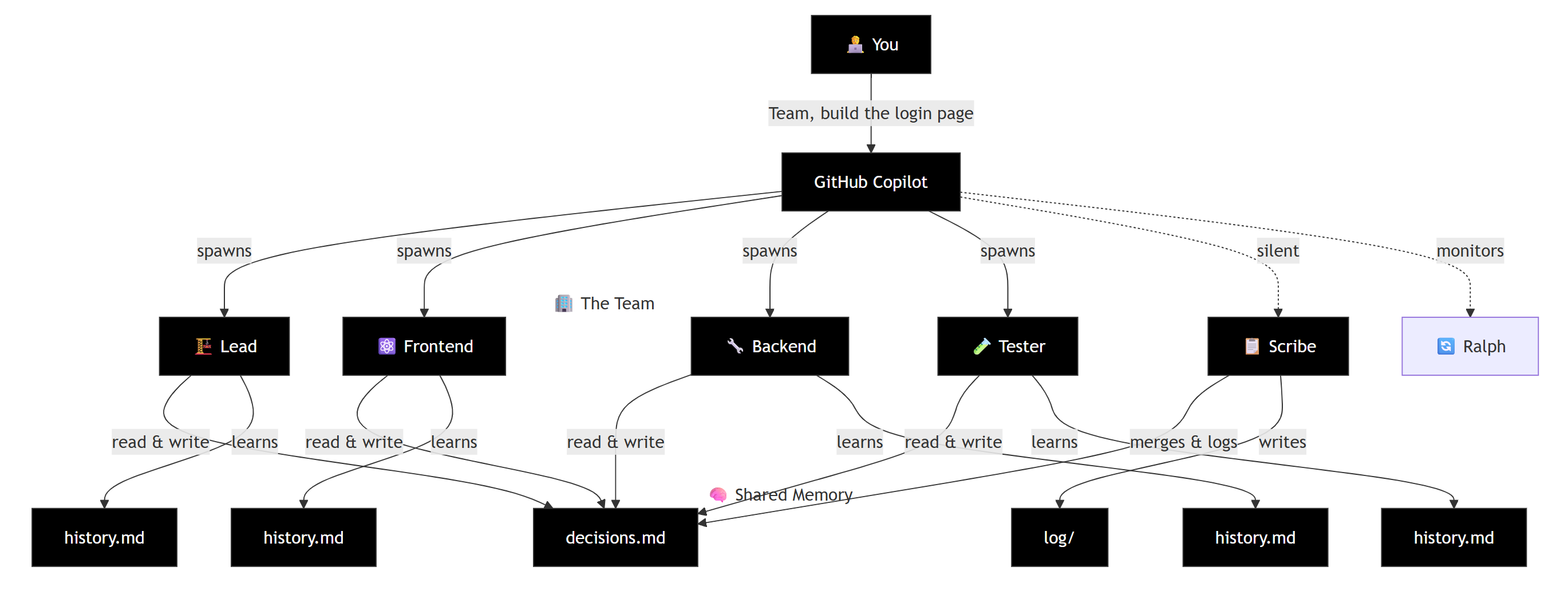
An example of Squad’s architecture
What will I need to run it?
The design of the Squad project itself is interesting - it’s a single node package, installed via npx github:bradygaster/squad without any other dependencies (i.e. you won’t need to run npm install after). The npx install itself brings in Squad’s files into your repo - the custom agent definition, Actions workflows, templates, and scripts.
To interact with your squad, you’ll need:
- The GitHub Copilot CLI, and optionally VS Code for interactive use in your IDE
- The GitHub CLI itself (to authenticate and access issues when needed)
Show me an example
There are a ton of sample prompts on the Squad site that show off how you can use it to create interesting applications.
Here I took the Dungeon Crawler sample prompt:
Build a browser-based roguelike dungeon crawler. Procedurally generated dungeons, permadeath, turn-based combat.

Requirements: - Dungeon generation: procedural rooms + corridors using BSP or cellular automata, 10 floors with increasing difficulty - Character: warrior/mage/rogue classes with unique abilities (3 each), health/mana/stamina stats - Combat: turn-based, grid-positioned. Melee, ranged, and AoE attacks. Enemy AI that flanks, retreats when low HP, and uses abilities - Items: weapons, armor, potions, scrolls. Random loot tables per floor. Item identification system (unidentified scrolls/potions until used) - Fog of war: tile-based visibility using raycasting from player position - Rendering: HTML5 Canvas with tilemap. 16x16 or 32x32 pixel art style (use simple colored squares if no art assets) - Permadeath: when you die, it's over. High score table with character name, class, floor reached, cause of death - Save system: save-on-exit only (no save scumming). LocalStorage.

I want one agent on dungeon generation, one on combat + enemy AI, one on items + loot tables, one on rendering + fog of war, and the tester. These can all build simultaneously as long as they agree on the tile/entity data model. Start building.
And soon enough my agent replies with a proposed squad for this work!
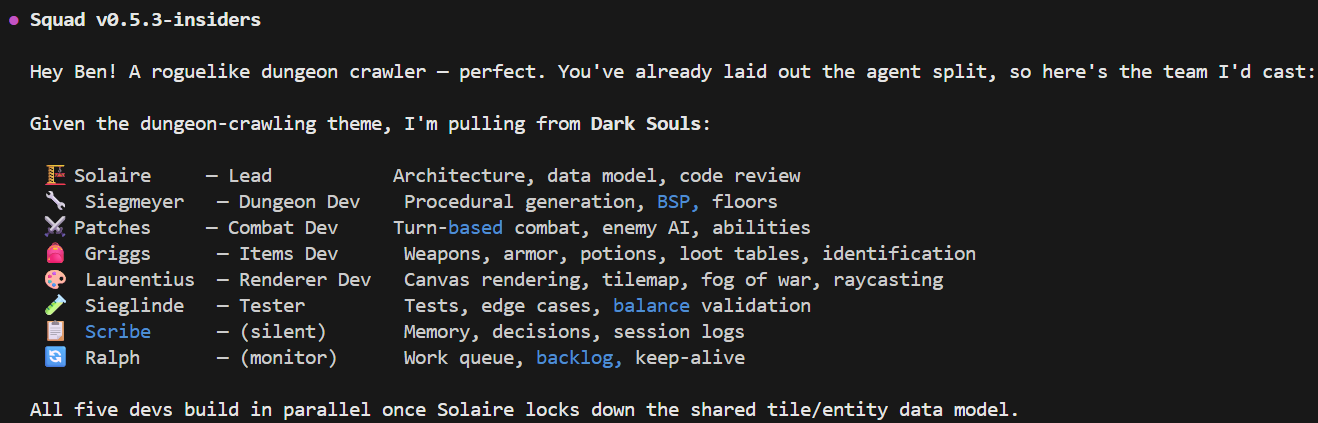
Choosing my Squad members
For the next 15 minutes or so, my new squad busily works away on building my application. Everything happens locally within my git workspace, using Copilot CLI to coordinate work. In my case the result looked something like this - not bad for a one-shot prompt hey?
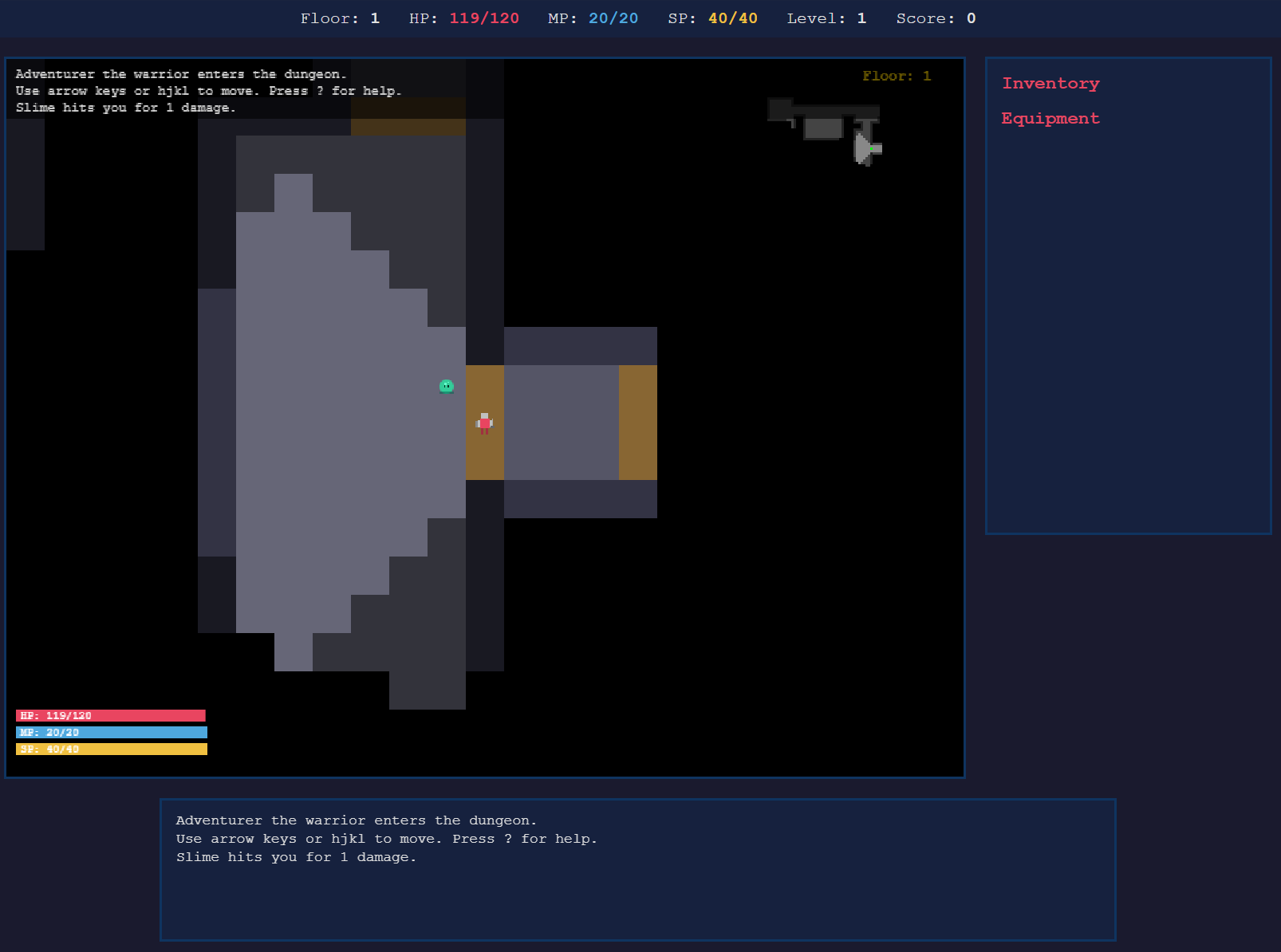
Reviewing my squad’s work - a fully playable browser game
What makes Squads special?
- Squad agents keep their own memories, helping them to avoid past missteps or issues in future work sessions. These are persisted as files in the repo itself, and any agents can do this - Squad just actively encourages this to help multi-agent collaboration.
- Work routing can be done either explicitly (i.e. tell your squad which agent you want a task done by) or implicitly based on things such as domain or skill access. Each agent can also be customized to use a different model suited to their work.
- Squads can be asked to work locally on your PC, but also in the context of GitHub Issues and GitHub Project boards, using a labelling system to manage assignment and status.
- Squad agents are also encouraged to develop their own skills when appropriate (using the Anthropic Skill.md standard) and save them into your squad’s folder.
- Squads support adding human members into a role (SME, lead architect, security reviewer, etc), and the squad lead will route tasks or decisions to them accordingly. You can also add or remove AI agents in your squad over time and export the whole squad for use in other repos if you’d like.
When would I use this?
The obvious downside to Squad is the higher premium request usage that comes with any multi-agent system. The team has optimized this already, but if you’re budget constrained then do keep an eye on your quota. This pattern will suit more complex work scenarios and larger codebases, and not linear tasks without the need for specialist skills/knowledge.
There’s also a modest ‘coordination overhead’ here that means that assigning similar work to a single agent with a capable model like Opus 4.6 will complete faster. What you’ll miss are the benefits around persistent memory, optimized context window, and the ability to focus attention of individual agents onto specialized tasks.
What’s next?
As a very new project from less than 2 weeks ago, Squads is under active development with new features rolling out regularly in the Stable and Insiders builds. Expect breaking changes, but there looks to be some interesting integrations coming.
Where can I check this out?
A great place to start is the official Squad documentation, which walks you through initial setup and more advanced usage: