Getting to know the new Microsoft Foundry platform
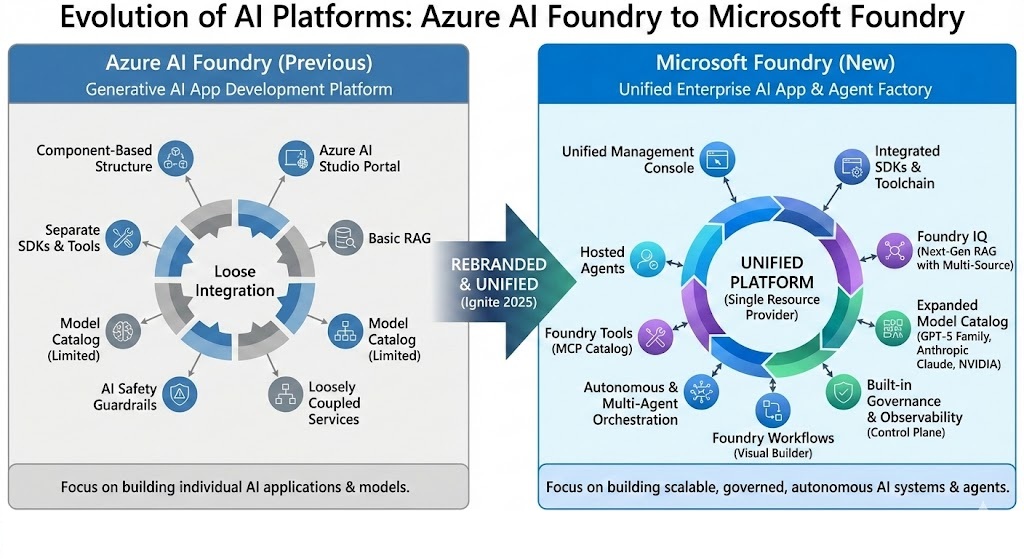
My initial thoughts on the newly launched Microsoft Foundry
I’ve always loved the few days directly before/after the end-of-year holidays, as a quiet time to deep dive on new tech and announcements from recent months. For me this year that was Microsoft Foundry - the newly launched platform replacing Azure AI Foundry and consolidating all of Microsoft’s pro-code related AI developments from the last year. It was launched at Ignite in late November, and I finally had time this week to get to know the new portal and related features.
My initial reaction? This is much more than a simple re-brand: while some features did migrate over from the previous platform, there’s a surprisingly large number of new things here that developers are going to love! Here are my favourite changes so far:
A refreshed Portal experience
The new portal just feels better - tidier, intuitive navigation, filled with code samples everywhere.
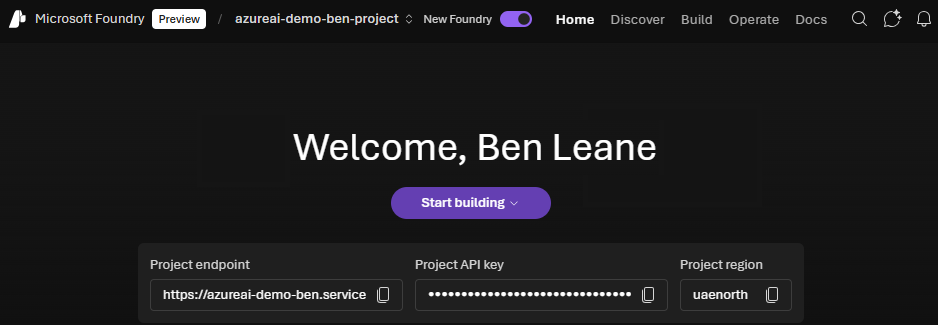
New homepage for the Foundry portal
Everything in the new portal is grouped into 4 new pages:
Discover: This is your ‘browse’ area across three areas: models, tools (MCP + others like Logic App connectors), and templates (just newer MSFT authored ones for now, still go to Awesome AZD for community ones)
Build: Where you will find most developer-focused features, from building new agents and tools, deploying and tuning models, and configuring knowledge and data sources. It’s also home to the brand-new Workflows module (see below)
Operate: This is Foundry’s new consolidated home for operating your AI applications, with a top-down view of all your assets (agents, models, tools), and links to a new monitoring page showing how each is performing. Previously most of this was offloaded to Azure Monitor, so it’s nice to see native dashboards right in Foundry. You also set your Policies and Quotas here and access general Foundry Project admin settings.
Docs: Just embedded versions of the same docs from learn.microsoft.com, but there’s a new Quickstart tutorial here that walks you through the new portal experience. You’ll need these docs on speed-dial as there’s a lot to learn and changed recently!
Throughout all the pages is a new ‘Ask AI’ chat experience that has presumably read all the new docs and can answer any Foundry related questions. Seems an obvious inclusion given Foundry’s mission of enabling knowledge-driven agents, but the old portal didn’t feature one and this can stop you toggling back-and-forth between pages of docs.
The pivot from model-centric to agent-centric
The previous AI Foundry portal guided you to a model catalog first. The new portal invites you to start building agents or workflows, and then links you to models as a follow-up step. That’s a small change but very in tune with the agentic age we’re now in.
If you’ve built agents using the previous portal, you may find that they don’t show up here at first. That’s because there’s some migration effort to upgrade what Microsoft now calls ‘Classic’ or ‘V1’ agents to the new ‘V2’ ones.
What has changed? Largely the move from OpenAI’s Assistants API to their newer Responses API and associated SDKs. The Responses API brings a bunch of improvements around performance, managing conversation state, and tool use, so you’ll want to use the migration tools to upgrade asap. The Assistants API will sunset in mid-2026, so you have a bit of time to plan this.
Introduction of Foundry Workflows
Found in the Build page, the Workflows module is brand new as part of Microsoft Foundry’s launch. It’s a visual editor for agentic workflows (with access to code behind), and at first glance it looks similar to AutoGen Studio which Microsoft released a year ago. But while that was considered a research project, this is apparently designed for scalable Production use, and these workflows connect natively with other Foundry features like the agents themselves, monitoring, evaluation, etc.
I haven’t tried building custom workflows myself yet, but from looking at the example workflows the overall UI looks very polished! In 2025 multi-agent workflows or apps were challenging to build and run well; this will hopefully make them more practical.
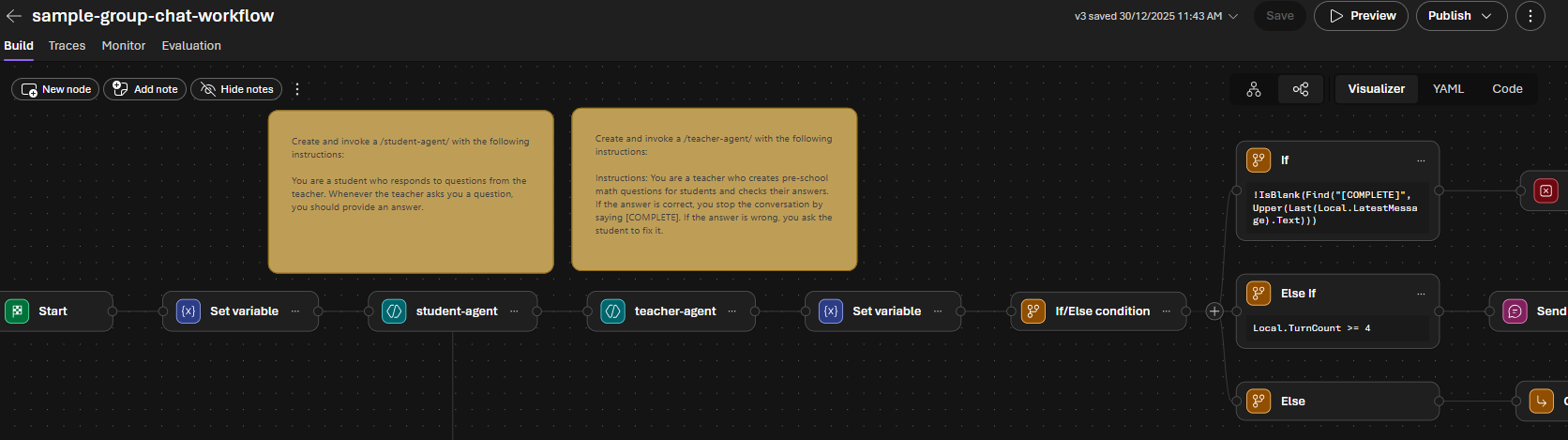
Example of Foundry Workflows visual editor
Integration with VS Code and CLI
It wasn’t just the Foundry web portal that got an overhaul. At the same time the VS Code and CLI extensions got big upgrades to help you build against Foundry projects straight from existing dev tools:
AI Toolkit for VS Code received major updates since Sept ‘25, with a redesigned Agent Builder UI, built-in GitHub Copilot custom agents for doing agent development, and more
The Azure Developer CLI team launched a new AZD AI extension, which automates many Microsoft Foundry actions including deploying Foundry infra, and creating and managing agents. That makes running an azd ai agent init the fastest way to get a new Foundry agent online if you have a blank Azure subscription!
Keeping up with the changes
There are tons of features I didn’t cover (simplified Hosted Agents, built-in memory, Foundry IQ for knowledge sources), and if you want a full list there’s a good summary at Accelerating Enterprise AI with Microsoft Foundry.
One thing is clear from my experience building these new-generation agents this week: things are continuing to change fast for AI developers, and it seems 2026 will bring continual re-architecting across SDKs, APIs, and the models or tools themselves. Two things that have helped me to keep up are:
Using the new AIAgentExpert custom agent, a GitHub Copilot agent bundled with AI Toolkit for VS Code that has direct access to best practices and guidance for the new platform and frameworks
If working with other Copilot agents, providing links to documentation (in your prompt or instructions files), to ensure your agent reads and understands that syntax over older SDKs and approaches
Happy devving and can’t wait to see what type of AI Agents people build this year!